|
| Tip of the Week | February 6, 2012 Volume: 2 | Issue: 6 |
What is StockChecker? When you see the icon you can click it to have a mini-window appear (while you are still on the original site) that shows what you have in stock at your store. In addition to viewing your sales history and current on hand, you have the option of adding the book to your WebStore's cart (i.e. viewing PubStock and ordering the item for the store), all without leaving the site that you are on. (Obviously, StockChecker is available only to those who have a WebStore through us.) The cart in the StockChecker window functions exactly the same as the one on your site. If you are sending us a backup file, you will be able to view your store’s class or notes on any item you have in stock or on order. If you are adding a new item into your cart, you can assign it a store class AND add a note to the item if desired, both of which will be transferred to the new inventory card created in your BookManager software for the new item (when you submit the orders from your online cart into your BookManager software.) This saves a ton of work during receiving (your receiver will thank you!) and ensures that every item in your inventory file has a proper class assigned to it. (For this reason alone, aside from the warm security blanket of having a reliable online backup, all of you who have a WebStore with us should be sending us a backup. Fantastic value for $0.18 per day!) Do all browsers support BookManager's StockChecker? How do I install the StockChecker? How does the StockChecker know which store to show stock from? Why does the StockChecker icon not always appear beside an ISBN?
Tip: Online BackUp – Taxes and Classes on your WebStore! We have about 140 stores currently using our BackUp service and as such, we have made many strides to make it even more useful. But, there are still a good handful of you with WebStores who do not subscribe – how come? Give us a call and let’s talk about WHY you really should be using this, especially since you have a WebStore. We have added so many features to the BackUp subscription, that it has become more than just a way to keep your core BookManager files safely and securely stored. Over the last few months or so, we have been able to seamlessly integrate your data so that is available for your own use on your WebStores. There are many benefits to this - of course having the ability to see online, your own sales/returns/receiving history is super valuable and incredibly convenient – but that was just the start for us. Anyone with a BackUp subscription will know that we recently added the calculation of taxes for customer orders. This was a pretty big deal, as it puts you that much closer to being able to give the most accurate pricing information on your sites.
Speaking of Class files … Didya know that if you are subscribing to our BackUp, you can apply your own classes to items as you are cruising around on your site ordering stuff? As was mentioned in the StockChecker tip above, you can save time by adding classes and notes to titles as you order them.
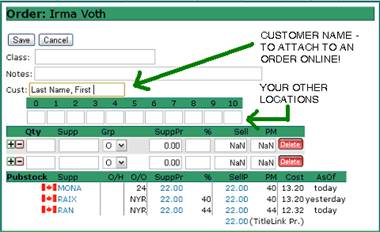
Once this order is uploaded and sent to your BookManager software, all your own personal classes and notes appear on the title – thus proving to be a super timesaving process of ordering books for your store. This makes things more efficient as you don’t have to add these classes or notes while receiving! So that is another reason why you should be using our online BackUp service – contact us for the full scoop! Also – as a head’s up, we are re-working your WebStore cart a bit to include … DRUM ROLL please … multi store ordering! Yes, that’s right, for all you multi-store folks, you will soon be able to order books on behalf of your other locations on just one site, right in the comfort on your own home, while you kick back in your bathrobe sipping on a hot chocolate. Oh AND soon you will be able to attach customer names to orders on your site! Once again, another reason to be subscribing to our BackUp! SNEAK PEEK BELOW!
|
|
 - adorable!) to the right of any numbers that appear to be ISBN.